Bringing Real-Time Data to the Web – A Live Example using Node.js, Pusher, and FME Server


I previously talked about bringing real-time data to the web using WebSockets. WebSockets make up one piece of the technology stack required to bring real-time data to the web. In this article I will explore the other pieces you need via a working demo I built which you can interact with.
My Live Example
There are two parts to this example and you can play with both of them.
- The Editing Application allows you to add, update and remove polygons from a map. Think of it as a community collaboration tool that anyone can use to add/update data on a map. Open the Editing Application
- The Real-Time Display Application allows you to see a realtime feed of the data being edited in the editing application above. Open the Real-Time Display Application
How to Play with the Example
The idea is that you open both applications. You can then make edits to the polygons in the editing application, and instantly view the edits you/anyone else made in the display application without having to refresh. To make it a bit more fun I added a Twitter stream to the display application which shows a live feed of all the edits being made.
Architecture Diagram
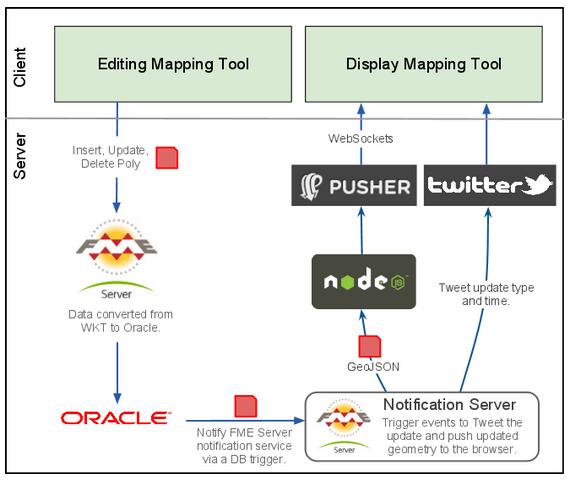
Here is an overview of the architecture:
Key Technologies
FME Server
 FME Server is at the heart of the architecture.
- Step 1
- Triggering an external web service via a web call (I could hit any web service on the Internet which means the possibilities are endless)
- Tweeting a message to @FMEServerDemos.
FME Server is used to load the edits, that people make on Google Maps, into Oracle.
Step 2
Once the data is loaded into Oracle, a stored procedure runs which sends a message to the FME Server notification service. The notification service then triggers a series of events, posting an update about the edit to Twitter and streaming the geometry back to the second Google Maps application via WebSockets. This is the power of the FME Server notification server, you can subscribe as many actions as you want to an event. In this scenario I am just performing two tasks:
I could have just as easily configured the notification server to send an email or run another process on FME Server.
Node.js
 I used Node.js to create a web server that the FME Server notification server interacted with. Many other people have taken the time to do a full review of Node.js, so I won’t here. However, what I liked about it was that it is extremely lightweight, easy to setup and configure, and best of all you write applications on the server-side in JavaScript. From the reading I’ve done, it also seems it is highly suited to supporting real-time applications as it is an event driven, asynchronous I/O which means it scales well.
Pusher
 The final piece of the puzzle is Pusher. Pusher makes working with WebSockets extremely easy. It basically wraps the complexity of setting up and configuring a scalable WebSockets architecture up in a series of API calls. In this scenario the display application, which showed the real time updates of the edits, were pushed to the browser using the Pusher API. The other nice thing about Pusher is the the debug tools it comes with which allow you to see in real time the clients that have opened a connection up and the responses being sent from the server.
Applications similar to this do already exist, I think the significance of this architecture is the simplicity. By bringing together the right applications I only had to write 61 lines of code on the server-side and less than 400 lines of code on the client-side (total for both web pages) to achieve a relatively complex process. As services and application proliferate, utilising the correct combinations will become critical to ensure the time we spend coding web apps has not already been done for us.
So please play with the editing application and the real-time display application from the live demo – or view the video below – and let me know if you have any feedback.

Explore more blog content headline

Data-Driven Marine Operations: 5 Ways to Generate Actionable Insights from Ship to Shore

Introducing FME Form 24.0: Redesigned User Experience for Focus and Consistency

[New!] AI Assist in FME: How to Build Better Data Integration Workflows with the Help of AI